
Android System Intelligence
Screenshots

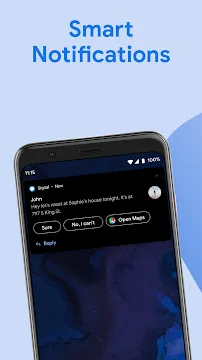



Android System Intelligence runs silently in the background of your smartphone. This smart tool operates as a core component of your operating system. Consequently, it runs local features without using the internet. You experience smoother interactions because it learns your personal habits. For example, it predicts your next actions based on your current context. Furthermore, the tool keeps your private data safe on your device. Android System Intelligence improves text prediction and automates daily tasks. It also handles smart replies and live translations seamlessly. Therefore, you get an intuitive user experience every day.
The system constantly adapts to your preferences over time. As a result, it makes your device feel customized to your specific needs. It functions without requiring constant user input or complicated adjustments. Thus, it enhances your phone usability without draining resources heavily.
What Is Android System Intelligence?
Android System Intelligence handles smart features across your device interface. Previously, Google named this essential component Device Personalization Services. However, the new name reflects its advanced capabilities better. The system works completely locally on your hardware. Thus, it does not send your private data to external servers. This architecture protects your privacy while offering excellent smart shortcuts.
For instance, it analyzes your notifications to suggest quick replies. In addition, it detects when you look at the screen. Therefore, your phone remains awake while you read an article. This feature prevents the screen from turning off unexpectedly. Android System Intelligence works continuously to customize your user interface. As a result, your smartphone feels much more responsive. It adjusts to your routine without requiring manual configuration.
You do not need to launch it manually. It loads automatically when you turn on your device. This constant presence ensures all smart features remain available instantly. Consequently, you experience no delays during daily use.
Core Features of This Smart Component
This system component handles several automated tools on your smartphone. You use these functions daily without realizing their origin. Here is a list of the primary features managed by this system component:
- Live Caption: It creates real-time subtitles for any media playing on your phone.
- Smart Text Selection: It recognizes phone numbers and addresses to provide quick links.
- Screen Attention: It keeps your screen bright while you look at it.
- Now Playing: It identifies songs playing in your environment automatically.
- Live Translate: It translates text messages and conversations in real time.
First, Live Caption operates during video playback. This action happens locally without an active network connection. Second, Smart Text Selection assists during text editing. When you select a phone number, it highlights the dialer link. Similarly, it highlights maps when you select an address. These automated features make daily interactions much faster and easier.
How Android System Intelligence Protects Your Privacy
Privacy remains a primary focus for modern mobile operating systems. Android System Intelligence utilizes the Private Compute Core for secure data isolation. This secure environment keeps your personal information safe from other apps. Therefore, the data processed here never leaves your phone. The system does not share your typing habits with remote servers.
Additionally, you can clear the accumulated data at any time. Users retain full control over their personal information. For example, you can delete your device personalization history easily. This option resides inside your privacy settings menu. Furthermore, the system lacks direct internet permission. This design choice prevents accidental data leaks to third parties. Thus, you enjoy smart features without sacrificing your personal privacy.
Security updates arrive regularly through the system store. These patches protect the environment from potential software vulnerabilities. Consequently, your personal data remains safe over time.
Managing Android System Intelligence on Your Device
You can easily locate and manage this tool in your settings. First, open the main settings menu on your phone. Next, navigate directly to the apps section. Then, select the option to view all installed components. You might need to reveal hidden system processes to find it. Once found, tap on Android System Intelligence to view its configuration options.
From this screen, you can clear its stored cache. Clearing the cache often resolves minor performance issues. However, doing this might temporarily reset your personalized shortcuts. You can also disable the component if you prefer manual control. Disable it only if you do not want smart suggestions. Most users should keep it active for optimal performance.
The system runs efficiently and consumes very little battery power. It uses resources only when active processing is necessary. Therefore, managing it requires very little technical effort.
Why This Background Service Matters
Modern smartphones require deep automation to remain highly efficient. This background service acts as the brain for local automation. Without it, you would lose several convenient features. For example, your phone would not suggest relevant replies in messaging apps. Furthermore, automatic translation features would stop working instantly. You would have to copy and paste text manually every time.
Therefore, this component saves you significant time throughout the day. It anticipates your needs by studying your regular actions. Consequently, it optimizes your workflow without annoying interruptions. It works silently without displaying intrusive pop-up messages.
In addition, it coordinates with your keyboard to improve typing accuracy. This synchronization ensures that your phone adapts to your language style. It transforms your phone from a basic device into a smart companion.
Common Issues and Simple Fixes
Sometimes, background components encounter minor technical glitches. For instance, you might notice that smart replies stop appearing. Alternatively, Live Caption might fail to generate subtitles correctly. These issues usually happen after a major system update. Fortunately, you can fix these problems with a few simple steps.
You can use the following troubleshooting methods:
- Check for updates in the app store.
- Clear the system component cache.
- Reboot your phone completely.
- Verify your device privacy settings.
First, try to update the component via the store. Developers frequently release updates to patch bugs and improve stability. Second, clear the storage data of the component in settings. This action refreshes the system without deleting your main files. Third, restart your smartphone to clear temporary system memory. Usually, a quick reboot resolves most background conflicts. If problems persist, ensure your main operating system is fully updated.
Conclusion
Android System Intelligence plays a vital role in modern device automation. It powers the smart features that make your phone intuitive. Meanwhile, it maintains strict user privacy through local data processing. You get helpful suggestions, live captions, and smart text tools daily. Therefore, keeping this component updated ensures a seamless mobile experience. It works quietly to make your smartphone genuinely intelligent. You can trust it to manage your daily tasks safely.
-
Samsung Wallpaper services
 Download
Samsung Wallpaper services
Samsung Wallpaper services provides automated background updates...
- Digital Wellbeing
- Android AICore
- Xiaomi Scanner
- Komi Store
- AdGuard VPN
- Phoenix Browser
- VPN & Antivirus by Kaspersky